
Multi-server control
Arkasm Pro can manage multiple ARK: Survival Ascended servers from one interface, with group actions and configurable delays.
Run one ARK server—or an entire cluster—without turning routine maintenance into a full-time job.
Arkasm brings installation, configuration, updates, scheduled maintenance, backups and live server control into a familiar Windows desktop application.
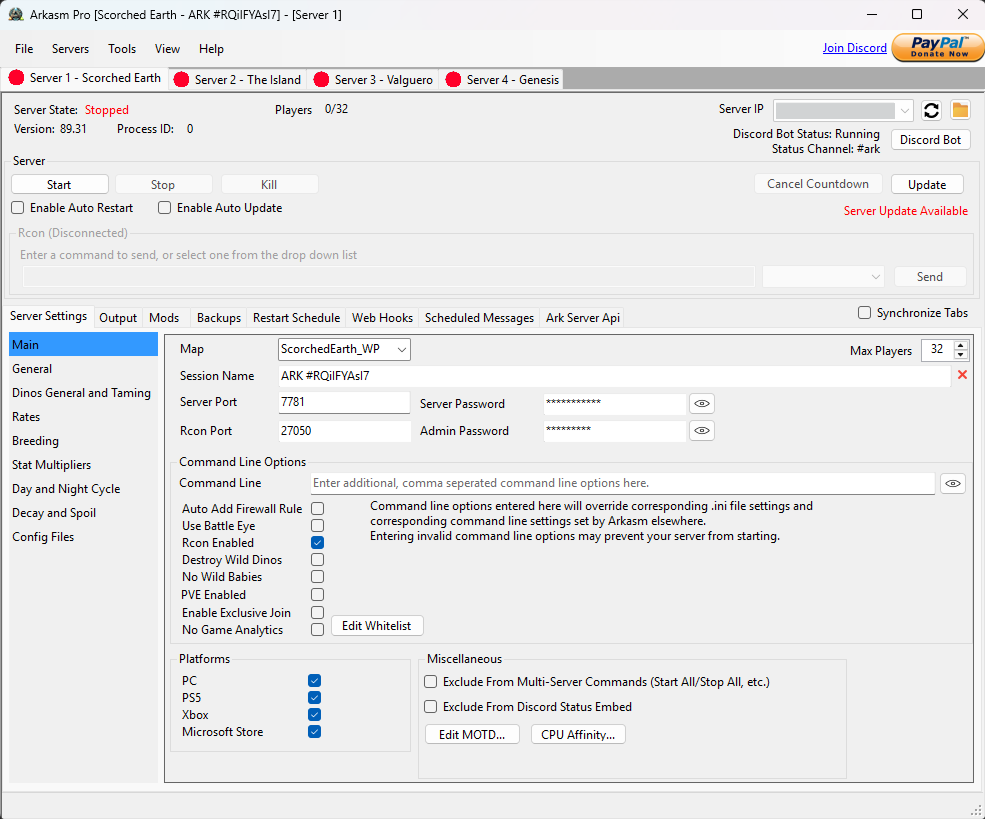
The page is organised around practical outcomes rather than a long list of minor settings.
Arkasm Pro can manage multiple ARK: Survival Ascended servers from one interface, with group actions and configurable delays.
Install, update or validate dedicated server files through SteamCMD, with automatic update checking and maintenance workflows.
Manage launch options, Game.ini and GameUserSettings.ini through organised controls while retaining direct file access.
Configure daily restart times, countdown warnings and automatic update-and-restart behaviour.
Create manual and automatic backups, restore saved data and use graduated retention to control disk use.
Send RCON commands, view connected players and handle common administration tasks from the manager.
Arkasm Pro can install and maintain the Ark Server API and assist with API plugin management.
Send lifecycle notifications through webhooks and use supported Discord integration for remote visibility and control.
See whether each server is stopped, starting, ready, shutting down or updating without tracking separate console windows.
Arkasm keeps the server process separate while giving you a central place to prepare settings, launch it, monitor its state and carry out planned maintenance.
Prices and availability are shown as a clear decision rather than buried inside the feature list.
Store pricing, discounts and availability may change. The itch.io product page is the definitive source at the time of purchase.
Visit the product page for the current download, price and release information.